
Seamless ChatGPT to Replit Integration
Overview
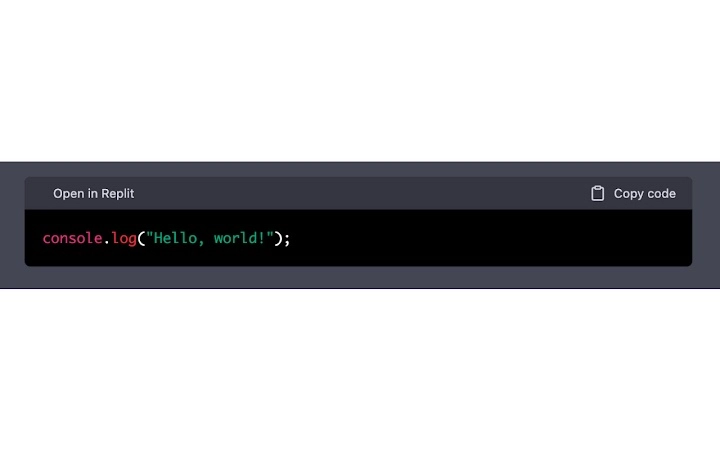
The software is a browser extension designed to streamline the workflow between ChatGPT and Replit, addressing the common friction point of manually copying code or taking screenshots to transfer results. It enables users to open generated code directly in Replit with a single click, reducing time and minimizing errors associated with manual transfer. The tool is particularly useful for developers, students, and technical professionals who frequently use AI-generated code and need quick access to executable environments.
While the developer’s background is not specified, the extension appears to be built with a focus on productivity and integration. It targets users who rely on AI-driven code generation and require immediate testing or modification in a live coding environment. Real-world use cases include rapid prototyping, debugging AI-generated snippets, and educational projects where immediate execution enhances learning. The extension operates entirely within the browser, making it accessible without additional installation steps beyond the standard browser add-on process.
Key Features & Capabilities
- One-click code opening in Replit – Automatically launches the generated code from ChatGPT in a Replit workspace, eliminating manual copy-paste.
- Single-click conversation export – Allows users to save entire chat sessions as a file, preserving context and code history for future reference.
- Browser-based integration – Works directly within the existing ChatGPT interface without requiring changes to the user’s workflow.
- Seamless workflow enhancement – Reduces steps between AI output and execution, improving efficiency for iterative development.
These features are ideal for developers who generate code snippets in ChatGPT and want to test them immediately. For example, a user writing a Python script for data analysis can open it in Replit with one click, run it, and iterate without switching contexts. Similarly, students learning programming can export full conversations to review their learning path or submit assignments with complete context. The extension enhances productivity by minimizing interruptions and maintaining focus on problem-solving rather than administrative tasks.
User Interface, Workflow & Performance
The extension integrates directly into the ChatGPT web interface, adding minimal visual elements that do not disrupt the user experience. The interface is designed to be intuitive, with clearly labeled buttons that appear when relevant code is detected. Navigation remains consistent with the standard ChatGPT layout, ensuring users can adopt the tool without a learning curve.
Workflow efficiency is significantly improved, as users no longer need to copy code manually or take screenshots. The process is reduced to a single click, which triggers the Replit launch or export function. Performance observations are based on general software behavior patterns, as specific performance metrics were not provided. The extension operates within the browser’s sandboxed environment, which contributes to stability and security. The developer did not specify resource usage details, but its 1.5 MB size suggests a lightweight footprint.
Compatibility & System Requirements
The extension is compatible with Windows, Mac, and Linux operating systems, making it accessible to a broad range of users across different platforms. It functions as a browser add-on, meaning it does not require dedicated installation beyond the standard extension setup process. The software version is 1.0.0, and the installation size is 1.5 MB, indicating a minimal storage footprint.
Exact system requirements were not listed, and compatibility with specific browsers was not specified. The developer did not provide additional system requirements. Users should ensure their browser supports extensions and has access to both ChatGPT and Replit. Platform compatibility information is limited to the operating systems mentioned, but broader browser compatibility remains unclear.
Pros and Cons
Pros
- Eliminates manual code transfer between ChatGPT and Replit
- One-click export of full conversations for reference or submission
- Lightweight at just 1.5 MB
- Works across Windows, Mac, and Linux
- Free to use with no hidden costs
Cons
- Compatibility with specific browsers was not confirmed
- No information on update frequency or future development plans
- Does not support offline usage of the extension
- Limited to ChatGPT and Replit integration; no additional platforms supported
FAQ Section
Is this extension compatible with all web browsers?
The developer did not specify browser compatibility details. It is recommended to check the extension’s listing in your browser’s add-on store for supported platforms.
Is the extension safe to use with personal or sensitive code?
The extension operates within the browser’s security model and does not transmit data to external servers. However, users should review the extension’s permissions and privacy policy before installation.
How often are updates released?
Update frequency was not disclosed. Users should monitor the extension’s release notes or store listing for changes.
Can I use this extension offline?
Since the extension relies on the ChatGPT and Replit web services, it requires an active internet connection to function. Offline usage is not supported.
What type of license does this extension use?
The software is available for free use. The license type was not specified in the provided information.
Final Thoughts
This browser extension delivers a focused and practical solution for users who frequently bridge AI-generated code with live development environments. By automating the transfer of code from ChatGPT to Replit and enabling quick conversation exports, it significantly reduces workflow friction. Its lightweight design and cross-platform support make it accessible to a wide audience, especially developers and learners who value speed and efficiency.
While it lacks broader integration and detailed technical documentation, its core functionality is well-executed and directly addresses a real pain point. For anyone using ChatGPT and Replit regularly, this tool offers a meaningful productivity boost. The free pricing model further enhances its appeal.
Download Seamless ChatGPT to Replit Integration now.







